Home screen
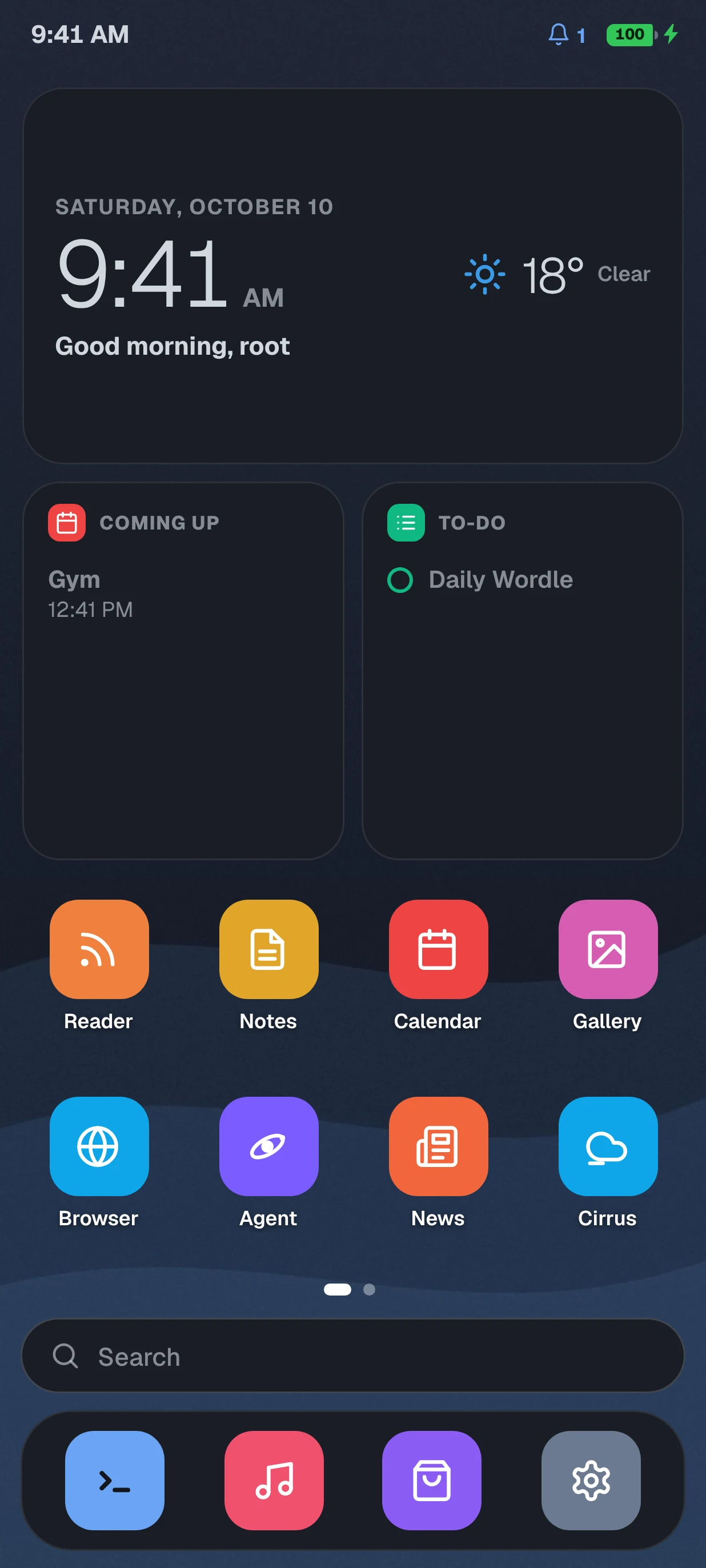
Pages of apps and widgets, folders, a dock and a menu on everything. Hold an empty spot to drag things anywhere, resize the grid and change the icons.
A note from Snek
4.5 is here. But it's not the 4.5 I told you about, so let me get the bad news out of the way first.
There's no File Manager and no modding update in this one. Custom ROMs, the Theme Creator and the App Creator didn't make it. They got delayed. They're very hard to make, way harder than I thought when I announced them. I'm still working on it, but there's no date and no version number. You know how I am with dates.
So what did 4.5 become? OrbitOS opens to a real home screen now, like a phone. Pages of apps and widgets, folders, a dock, and you can drag everything anywhere. Hold an empty spot and it goes into edit mode, everything wiggles, and you can add widgets, change the wallpaper and make it yours.
It moves like a phone too. Swipe up from the bottom to go home, stop halfway for Recent apps, swipe from the left edge to go back, swipe down for the quick panel. Apps open out of their icon and close back into it. If you hate gestures, there's a classic back, home and recents bar in Settings > Navigation.
The Terminal is its own app now, with its own settings. There are 10 new games (Dino Run, Pong, Star Defenders, Stack, Sky Hop, Lights Out, Slide 15, Word Search, Reversi and Reflex), and I'm giving everyone 15,000 free coins to try them. Redeem them on the Games page.
Weather has a new privacy option, Detect by IP. It's on by default, and if you turn it off OrbitOS never looks up your location and just shows a random city. Setup got rebuilt for all of this too.
About performance: I'm trying my best, and I can't promise a perfect 60 fps everywhere. I wrote it all down in the FAQ.
It comes as an OTA update, 438 KB. Open Settings and check Software update. Found a bug? Tell me in Discord with your device, browser and a screenshot. Thanks guys, fr.
Snek, made OrbitOS on a phone
What's in 4.5
I made this on my phone because I was bored and it kind of got out of hand. It's got a home screen, apps, games, an AI that can actually do stuff, backups and themes. All in a browser tab.
Made by Snek · HTML, CSS & JavaScript


Showcase
Real screenshots from the OS on a phone-sized screen. Tap a screen, or swipe the phone.
01 / 10
Features
Pages of apps and widgets, folders, a dock and a menu on everything. Hold an empty spot to drag things anywhere, resize the grid and change the icons.
Swipe up to go home, stop halfway for Recent apps, swipe from the edge to go back. Apps open out of their icon. Prefer buttons? Switch in Settings.
Swipe in from the left for the weather, what's coming up, your to-dos, what's playing, the daily puzzles and a quote.
An AI that knows which app you're in and can actually do stuff. Tell it to open an app, change the theme, or a few things at once.
10 new ones in 4.5, like Dino Run, Pong and Reversi, plus daily Wordle and Sudoku with streaks. Coins unlock skins in the shop.
Weather, Calendar, Wikipedia, News, RSS, Music and more. Cirrus and Agora let you read Bluesky and Mastodon without an account. The Terminal is its own app, with APT inside.
Nine wallpapers, accent colors that work with every theme, AMOLED and other themes, and your own name, color or photo for any app icon.
Automatic backups as often as you want, restore in two taps. Move to another device with a QR code. Old locked .orbitbak files still work.
Design v3
Design v3 is the only design now, the old look got removed in 4.4.1. This site uses the same colors as the OS.
#13161c#191d25#d2d7df#6aa4f5#45b36b#ef6461Delayed · not in 4.5
This was supposed to be 4.5. It's not in there. Custom ROMs, the Theme Creator, the App Creator and the File Manager are all delayed, because they're very hard to make. Way harder than I thought. No date and no version number yet, I'll post in Discord when I have something to show.
Install OSes other people made, or make your own. OrbitOS isn't open source, so I still have to figure out how you'd make one without seeing the code.
Make your own colors, fonts, accents and blur instead of using the presets.
Build and package your own apps to run inside OrbitOS.
Browse your files, make folders and sort your media in an actual file explorer.
FAQ
Yes. It's vibecoded. You can stop typing now.
I swear I can't post anything without someone coming in my comments with "vibecoded" like they cracked the case. Like bro, I know. I'm the one who made it. I said it in the announcements, I said it in Discord, I said it on this exact website, in this exact FAQ that has the word "vibecoded" in the title. You didn't expose anything, you just showed everyone you didn't read anything before commenting. Idk what you expected me to say, "oh no, you got me"?
Also, every single person who comments that has never made anything. Not once has someone with an actual project come in and said "vibecoded". It's always the guy with no posts and a default profile picture. Funny how that works.
The whole thing is made on a phone. I don't have a PC or a laptop. Every app, every game, the AI agent, the encrypted backups, the QR code transfer, the OTA updates, all of it typed on a phone screen with my thumbs. If you think that's easy, go try it. Seriously. I'll be here.
The AIs I've used: Claude, Google Jules, Codex, Gemini, GitHub Copilot and Vibe by Mistral. Right now it's mostly Claude and Jules. The whole 4.4.1 update was done in one day with Claude Opus 5.5. Every one of those tools is available to you too, so if it's that easy, where's yours?
At the start I was literally copy pasting code between different AIs. One would write something, another would fix what the first one broke, then a third one would break both. Half the time everything died and I started over. I kept going anyway. Most people who leave "vibecoded" comments wouldn't have lasted a day.
Now it's 60,807 lines of code across 88 HTML, CSS and JS files, about 2.9 MB. A home screen with widgets and gestures, its own apps, 34 games, an AI agent that actually does stuff, encrypted backups, QR code transfer between devices and real OTA updates. One guy. One phone.
And vibecoded doesn't mean the AI did everything while I slept. I decide what goes in, I test everything, I find the bugs, I get the AI to fix them, then I find the new bugs the fix made, and I do it again until 3 AM. That's my time, my ideas, and my problem when it breaks.
So no, you're not the first one to notice, and you won't be the last. Next time someone comments "vibecoded" I'm just linking this page and moving on. If it bothers you that much, close the tab, nobody's forcing you to be here. If it doesn't, welcome, enjoy the OS :D
It's a solo hobby project, so bugs happen. If you find one, report it in Discord with the steps, your device and browser, and a screenshot if you can. That actually helps, unlike typing "vibecoded" for the hundredth time.
Oh yeah let me just write a kernel on my phone real quick. Drivers, bootloader, memory management, file systems, support for every device ever. With my thumbs. Gimme 20 minutes 🫠
For real tho, real OSes take huge teams of paid people years to make. I'm one guy with a phone and no PC. I can't even test a real OS, I'd have to boot it on something and the only thing I have is the phone I'm typing on. Should I flash my only device and hope it turns back on? Yeah no.
Also this "stupid HTML project" has 60,807 lines of code, a home screen, its own apps, 34 games, an AI agent, encrypted backups, QR code transfers and OTA updates. Pretty good for something stupid.
And I'm not wasting my time, I'm having fun. OrbitOS started as a random idea, now I actually love working on it and people use it. You know what's a waste of time? Going on someone's hobby project to tell them it's a waste of time (¬‿¬)
Will I ever make a real OS? Idk, maybe when I have something that isn't a phone. Until then it stays fake, and you can keep calling it stupid while it keeps getting updates :)
No, it's fake. A pretty good looking fake, but still fake 🥀
It's a website trying really hard to be an OS. HTML, CSS and JavaScript with apps, settings, accounts, a terminal, a lock screen and updates, so it looks and feels like one. But it's a browser tab.
It doesn't touch your hardware, it doesn't boot anything and it won't make your phone faster. If someone told you it's a real OS, that wasn't me, I've called it fake since day one.
Sure, delete Windows, then try opening OrbitOS. Oh wait, you can't, your browser was running on Windows 🫠
OrbitOS runs in a browser, and the browser runs on your real OS. Remove the real one and OrbitOS goes with it.
So no, it doesn't replace Android, Windows, Linux, macOS or your smart fridge. Your real OS does the boring stuff, OrbitOS is just the fun part on top.
No, you just open orbitos.lol. That's it.
No download, no installer, no account needed to start (or grab the APK on Android). If your browser lets you install web apps, you can add it to your home screen so it opens like an app.
Bro it was literally made on a phone. Yes.
It works on phones and on desktop. If it's slow, check the performance question below.
Yes, every line. People keep asking like I'm gonna admit I had a gaming PC in my closet the whole time. I don't 🥲
It's just me, a phone and a bunch of AI tools, in HTML, CSS and JavaScript. No PC, no laptop. Way too much free time tho. Check "Is OrbitOS vibecoded?" above for the whole story.
No. Trust me, you don't want to read 60,807 lines of vibecoded code written on a phone at 3 AM. I don't even want to and I made it.
It's closed source for now. Might change one day, no idea when. If it does, Discord hears it first.
It means "over the air". OrbitOS updates itself like a phone does, but only when you tell it to.
When there's a new version you get a card on your home screen, and Software Update shows everything that changed. Tap Download and install and OrbitOS restarts on the new version. If the download fails nothing breaks, you stay on what you had. Security updates will keep reminding you every time you open OrbitOS until you install them. Yes it nags, that's on purpose.
OrbitOS is a phone OS now. A home screen with pages, widgets, folders and a dock, phone gestures that follow your finger, the Terminal as its own app, 10 new games, 15,000 free coins, new Home screen and Navigation settings, a rebuilt Setup and a Detect by IP weather privacy option.
No File Manager and no modding update though, those got delayed. The full changelog is in Settings, in Software update.
Like a phone. Swipe sideways between pages, swipe right on the first page for Today and swipe up for All apps and search.
Hold an empty spot and everything wiggles, then you can drag apps, widgets and folders anywhere, add widgets and change the wallpaper. Drop an app on another one to make a folder. Hold an app for its menu, where you can rename it, change its icon, move it to the dock or uninstall it. The rest is in Settings > Home screen and Navigation.
Basically the stuff you already do on your phone, but inside a fake OS, inside a browser, on your phone. Yeah.
Read news and RSS, look stuff up on Wikipedia, check the weather, use the calendar, take notes, play music, do the daily puzzles, play games and boss the AI around. There's more in the App Store.
Or do what everyone actually does and change the wallpaper 40 times.
Open the App Store.
Or if you wanna feel like a movie hacker, there's an APT-style package manager in the terminal. Same apps, more typing.
No. It's a browser tab, it's not running Minecraft 😭
It only runs apps made for OrbitOS. The package manager can't install APKs, .exe files or Linux programs, and yes people have tried. If you want your own apps in it, you'll have to wait for the App Creator, it got delayed.
Yep. Open Look for the wallpapers, accent colors and themes like AMOLED, or use your own photo.
There's more in Settings, and the Home screen page lets you change the grid, icons, widgets and dock. The Theme Creator is delayed, so for now it's my themes and my design choices.
Not in 4.5. I said 4.5 would be the modding update with custom ROMs, a Theme Creator, an App Creator and a File Manager, and then it turned into the home screen update instead.
They got delayed because they're very hard to make. Way harder than I thought. There's no date and no version number, and none of it is in 4.5, so don't go looking. I'll post in Discord when there's something to show.
A lot of sites block being opened inside another page. That's them, not OrbitOS.
If a site won't load, just open it in your normal browser.
In your browser, with IndexedDB. Not on a server, I don't want your data.
It's tied to that browser and that site address, so if you switch browsers your stuff won't follow you. Use Move to another device or a backup for that.
There's a 512 MiB limit (536,870,912 bytes if you care).
It also depends on your browser and how much space your phone has left. If it's full of 4,000 meme screenshots, that's on you.
Open Backups. It can back up automatically as often as you want, and you can restore any of them in two taps.
You can also export a password-locked .orbitbak file (AES-GCM 256-bit) to keep somewhere else. To restore it you need the file and the password. Just turn on automatic backups, seriously.
Open Backups, tap Move to another device and scan the QR code with the other device, or type the 6-letter code if the camera's being weird.
It goes straight between the two devices after you confirm on both. No cloud, no account. Usually works first try.
Your OrbitOS stuff is gone 🥀
Clearing site data wipes your settings and app data. Private browsing and storage cleaners can too. Make a backup first, don't say I didn't warn you.
Nope, and I can't either. That's how encryption works.
Without the right password the file is useless, and there's no "forgot password" button. Write it down somewhere safe.
Orbit Agent isn't just a chatbot, it actually does stuff. It knows which app you're in and can open apps, change the theme, take notes, add to-dos or set reminders.
You can ask it for a few things at once too. An OS made with AI that has an AI in it, yeah I know.
No, your phone isn't running a giant AI model in a browser tab.
The app runs in your browser, but what you ask the AI (and some context) gets sent to an outside AI service. So maybe don't tell it your secrets. Or do, I'm not your mom.
Kinda. Once you've opened it once, it's cached, so the main stuff works without internet.
The first time you need internet though, and stuff like the AI, weather, news and search obviously need it too.
Real talk. I'm trying my best to fix all the performance issues, and 4.5 has a bunch of those fixes in it.
Unfortunately I can't get it to an average of 60 fps on every device. But you still get 60-90 fps, depending on your device. And no, I'm not lying.
Why it's not perfect: the bigger the code base gets, the worse the performance gets. OrbitOS is over 60,000 lines now, running inside a browser tab, so every new thing costs a little. But don't worry, it's not going to get very very bad. I'll keep working on it and improving it.
If it still feels slow, close the apps you're not using, turn off animations or blur in Appearance, and don't run a game, music and 12 apps at once. It's still a browser tab, it can only do so much.
Tell me in Discord. Just not "it doesn't work", that tells me nothing 😭
Say what you were doing, your device and browser, and send a screenshot if you can. More details = faster fix. If you wanna support me, the donate link is at the bottom, anything helps.
No install, no account, just open it. Or get the Android app.